Reference architecture
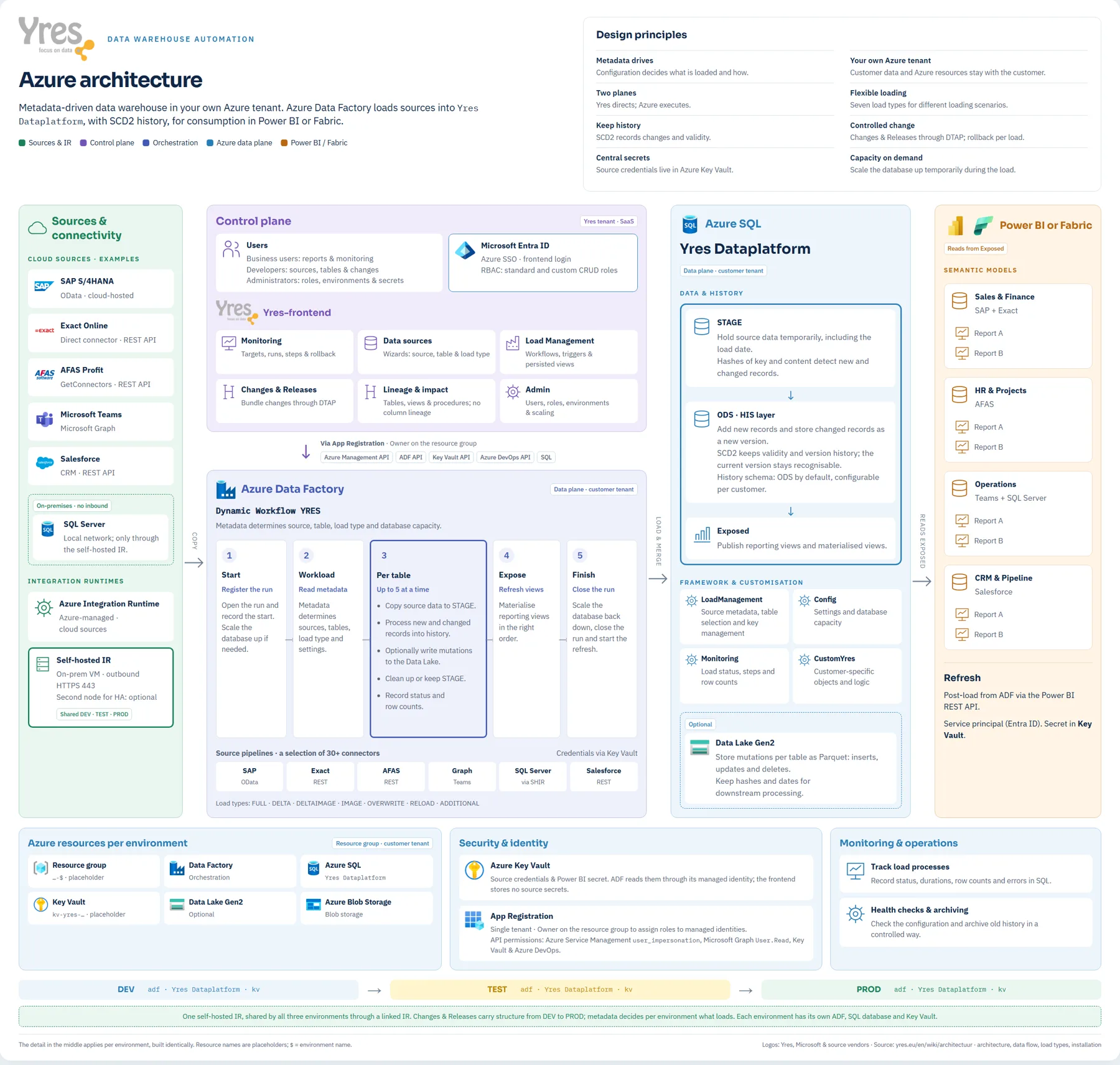
The complete Yres setup on Azure on one diagram. It shows which sources come in and how, what runs in the Yres tenant and what runs in the customer's tenant, how a load run proceeds and how Power BI or Fabric consumes the data. It is meant for architects, security teams and anyone preparing an installation.
Open the diagram at full size · Nederlandse versie
How to read the diagram
From left to right, the diagram follows the data.
- Sources and connectivity. Cloud sources go through the Azure Integration Runtime. Sources in your own network go through a self-hosted integration runtime that only makes outbound connections (HTTPS, port 443). No inbound port needs to be opened.
- Control plane. The Yres web app runs in the Yres tenant. That is where you set up sources, tables and changes. The web app manages the customer's Azure resources through an App Registration and never stores customer data itself.
- Azure Data Factory. One workflow loads everything in five steps: register the run, read the metadata, load per table (up to five at a time), refresh the reporting views and close the run. The metadata decides which source, which table and which load type.
- Azure SQL. Data lands in STAGE and moves to the HIS layer with SCD2 history. Reports read from Exposed. Optionally, Yres writes the mutations per table as Parquet to a Data Lake.
- Power BI or Fabric. Semantic models read from Exposed. After the load, ADF starts the refresh through the Power BI REST API.
The bottom row shows the Azure resources per environment, security and identity, monitoring and the DTAP pipeline. Each environment has its own Data Factory, SQL database and Key Vault; the self-hosted IR is shared by the three environments.
The sources on the diagram are examples. All connectors are listed under Integrations. Resource names on the diagram are placeholders.
Printing
The diagram is designed for A3 or A2 landscape. Open it at full size and print from the browser: it scales itself to a single page and always prints in the light colours.
Further reading
- Architecture: the two planes and the stack in text
- Azure architecture: resources, permissions, access levels and network
- CI/CD & DTAP: how changes move from DEV to PROD
- Load types: the seven load types
- Installation