A data warehouse in your own Azure subscription: what stays when you leave
Quarterly meeting at the wholesaler. Before Sanne, the data engineer, has even sat down, the board's question is on the table: what do we actually have if we stop using Yres in three years?
The short answer is: everything the data warehouse needs to keep running. Yres puts the database with every table and its history, the Data Factory with the pipelines and the key vault with the secrets inside the customer's own Azure subscription. The central Yres environment manages those parts remotely and holds no customer data itself.
What disappears after cancelling is the screen on top. Below you can read where everything lives, what happens the day after cancelling and what you need to be able to do yourself.
Published: · Last updated: · By Daniel Sanders, architect of Yres and founder of Plainwater
Where does the data warehouse live?
The data warehouse lives in a resource group in the customer's Azure subscription. The Azure bill for it lands with the customer too.
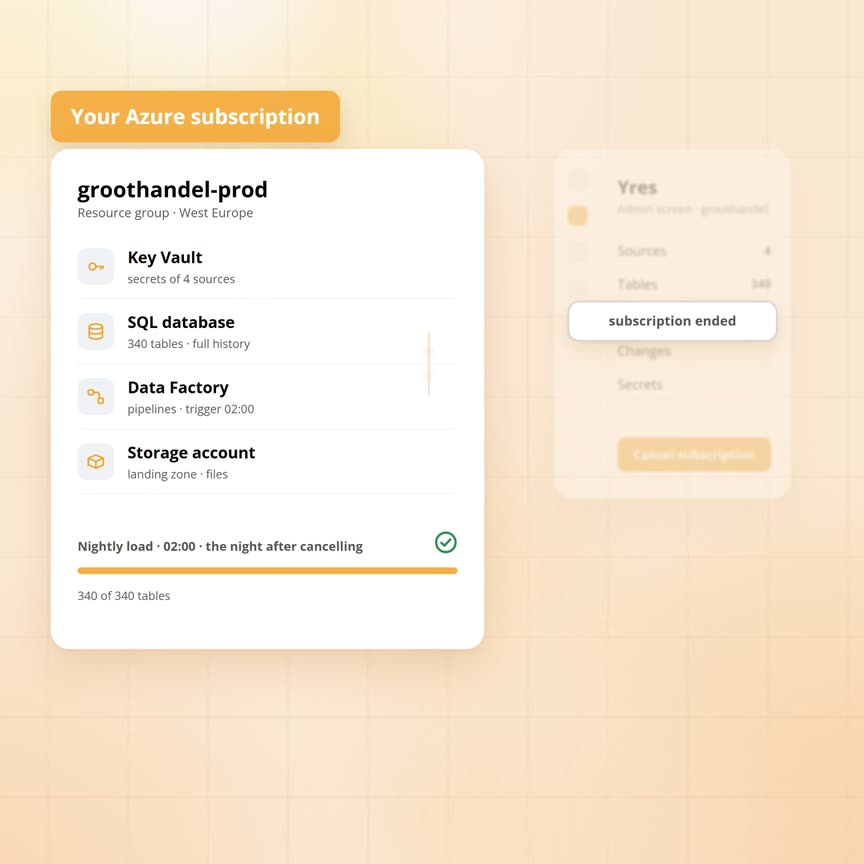
Sanne opens the wholesaler's Azure portal and shows the resource group of the production environment. It holds four parts that were put there during installation. The development environment has a second resource group with the same four.
The database. This is the data warehouse. It holds the 340 tables from the accounting package, the HR system, the planning package and the web shop. Every version of every row is in there, with the period in which it applied. The move of Bakkerij Ter Horst on 2 October sits there as a closed row with Zwolle and a new row with Deventer. The Yres records live in that same database too: the sources, the tables, the load mode per table, the watermarks and the log of every load. They are ordinary tables that any SQL tool can read.
The Data Factory. This holds the pipelines that load every night, one per source type. The schedule that starts the nightly load is a trigger in that same Data Factory. The definition of the pipelines sits in a git repository in the wholesaler's own Azure DevOps.
The key vault. This holds the password of the accounting package, the web shop key and the connection to the database. The pipelines fetch those secrets when they run.
The storage account. This is the landing zone for files. If the wholesaler switches on the data lake, it lives here as well.
What does the central Yres environment do?
The central environment steers the parts in the customer's subscription remotely. It holds no customer data and no source passwords itself.
The admin screen Sanne works in is not part of the resource group. It is a central web application that Plainwater hosts for all customers at once. It has its own records of organisations, users, environments per organisation, the version of each environment and billing. Source passwords go straight to the customer's key vault.
To be able to operate remotely, the wholesaler created an app registration in its own Microsoft Entra during installation. That registration was given owner rights on the resource groups. With that identity the four parts were put in place, through pipelines in the wholesaler's Azure DevOps. The database got its structure and the Data Factory its pipelines.
In daily use every action in the admin screen takes the same route:
- Adding a source. The central environment writes the connection into the wholesaler's Data Factory, puts the password in the key vault and registers the source in the database records.
- Refreshing metadata. The central environment starts a pipeline in the wholesaler's Data Factory.
- The monitoring screen. It reads the log from the wholesaler's database.
- A new version. It runs through the pipelines in the wholesaler's Azure DevOps, database first and Data Factory second.
So the admin screen itself never looks into a source. The pipelines in the wholesaler's Data Factory connect to the accounting package, with the password from the key vault. The admin screen only steers those pipelines.
What happens the day after cancelling?
The day after cancelling, the data warehouse simply keeps loading. Only the admin screen and the monitoring screen are gone.
Say the wholesaler cancels in three years. Under the settings in the admin screen there is a button that deletes the organisation. It removes the organisation from the Yres portal, but leaves the Azure environment alone. The next morning the resource groups, the database, the Data Factory, the key vault and the storage account are in the subscription exactly as they were the day before.
That night the load runs as it does every night:
- Start. At 2 am the trigger in the Data Factory fires.
- Plan. The workflow reads from the records which tables need loading and scales the database up a level.
- Fetch. Per table the pipeline for the matching source type starts. It fetches the password from the key vault, connects to the accounting package and puts the rows in the landing zone.
- Compare. The engine in the database compares the rows with the history table, closes versions and adds new ones.
- Finish. The watermark moves on and the database scales back down a level. Every step writes a line to the log.
Nothing in that chain asks the central environment for anything. It is the same load as the night before.
What does disappear is the screen on top. The admin screen, the monitoring screen and the expiry calendar for secrets belong to the central environment. After cancelling they are gone. The log the monitoring screen used to show is still in the database, as are the checks Yres runs on the content of the data warehouse. New Yres versions no longer arrive. The version running at that moment keeps running.
We impose no restrictions when you leave, which is also the commitment on the website. Nothing stops.
| Part | Where it lives | After cancelling |
|---|---|---|
| The tables and the history | A database on a SQL server in your own subscription | Stay. The nightly load keeps filling them |
| The pipelines and the schedule | Your own Data Factory, with the definition in your own Azure DevOps | Keep running on the same schedule |
| Source passwords and keys | Your own key vault | Stay. You keep an eye on their expiry yourself |
| The records: sources, tables, load modes, watermarks | Ordinary tables in the same database | Stay, readable and editable with SQL |
| The log of every load | Tables in the same database | Keeps filling, the screen on top goes |
| The admin screen and the monitoring screen | Plainwater's central environment | Gone |
| New Yres versions | Through the rollout pipelines in your own Azure DevOps | No longer arrive, the current version keeps running |
What still depends on Yres after cancelling
The board wants to know what still depends on Yres after cancelling. Sanne names four things.
A new source. Adding one runs through the admin screen. It writes the connection into the Data Factory, puts the secret in the key vault and registers the source in the records. Without the admin screen someone does those three steps by hand. The pipeline per source type already exists and does not need building. An extra table from a source that is already connected is a registration in the database records.
Refreshing metadata. The pipeline that reads the structure of a source again sits in the wholesaler's Data Factory. The admin screen has a button for it. Without that button you start the pipeline in the Data Factory yourself.
The encryption. In production the engine's procedures and functions are delivered encrypted. You can run them, but not view or change them. Rolling back can therefore still be done directly on the database, as our article on rollback describes. Rewriting the engine cannot. You build further with your own views, procedures and pipelines, in your own schema next to the engine.
Expiring secrets. The web shop key and the accounting package password have a shelf life. The admin screen shows an expiry calendar for them and warns before a secret expires. After cancelling nobody looks at that calendar any more. If a secret expires, loading that source fails. The log reports it, but someone does have to read it.
What you need to be able to do yourself are ordinary Azure skills that a data engineer like Sanne has:
- Read and write SQL, to consult the records and the log
- Operate a Data Factory, to start a pipeline or change a connection
- Maintain a key vault
Without such a person the data warehouse keeps running until the first change that needs attention.
When does this matter to you?
It matters as soon as you want to see the data warehouse separately from the vendor. Three situations make the board's question concrete.
A tender. An organisation that has to re-tender every few years does not want a data warehouse that leaves with the vendor. If it lives in its own subscription, only the party managing it changes. The data, the history and the reports stay.
A security review. The security officer asks where the wholesaler's customer data lives and who can access it. The answer is a resource group in its own subscription, in the region the wholesaler chose itself. The central environment steers that resource group through an app registration the wholesaler created itself. It stores nothing from it.
An in-house team that wants to build further. The wholesaler wants its own reporting model on top of the history layer. That happens in the same database, with its own views and procedures. If the wholesaler ever stops using Yres, that model is still there. It still reads from tables that are filled every night.
Where it stops
- If you want a fully managed service where the vendor hosts everything, Yres does not fit. The Azure bill, the rights and the network are yours
- If nobody is left after a departure who reads SQL or operates a Data Factory, the data warehouse runs until the first password expires
- If you want to modify the engine yourself, you run into the encryption
Frequently asked questions
Does my data warehouse keep running if I stop using Yres?
Yes. The trigger that starts the nightly load sits in your own Data Factory. The load reads from your own database and key vault and writes to your own tables. We impose no restrictions when you leave.
You say no lock-in, but without your admin screen I can't change anything, can I?
Less, that is true. What the admin screen did can still be done, but by hand in your database, Data Factory and key vault. That is work for someone who knows SQL and Data Factory. Only modifying the engine itself is not possible.
Does Plainwater see my data?
No. The central environment stores organisations, users, environments, versions and billing, without customer data, credentials or secrets. The admin screen steers the pipelines in your own Data Factory, but does not read your sources itself.
How do new versions arrive?
Through the rollout pipelines in your own Azure DevOps. First the database gets the new structure, with migrations scoped per version. Then the pipelines in the Data Factory are published. The tables with your data stay in place.
Talk to a data architect
In 30 minutes a data architect looks at your current data environment with you and at where it pinches today.
Book a call →