What rollback in a data warehouse really means
Rollback in a data warehouse means putting a table back to the state it had at a moment you choose. Everything that arrived after that moment is removed, the values that applied then become the current values again, and the point where the next load starts moves back with them. In Yres you do this per table, from the admin screen, with one date and time. This article follows a single example to show what happens, and where it goes wrong when you try it by hand.
Published: · Last updated:
What does rollback mean in a data warehouse?
Take a wholesaler that loads customer data from its accounting package every night. On Monday night an export fault in that package delivers the credit limits in the wrong column. The load succeeds, because technically nothing is wrong with it. On Tuesday at eleven the credit department calls: three hundred customers suddenly have a limit of forty thousand euros instead of twenty-five thousand.
An ordinary database can undo a change as long as it has not been completed yet. Here that moment is nine hours ago. The load has finished, the reports have refreshed, the dashboards show the new limits. Rollback therefore means something different from what it means in a database: you pick a moment, say Monday 23:59, and put the table back to how it was then.
It works per table. The faulty export only touched the customer table; the orders, products and stock loaded the same night are fine and have to stay. So you give the name of the table and the moment you want to return to. Putting two tables back is two actions, each with its own moment.
Why keeping history is not the same as rollback
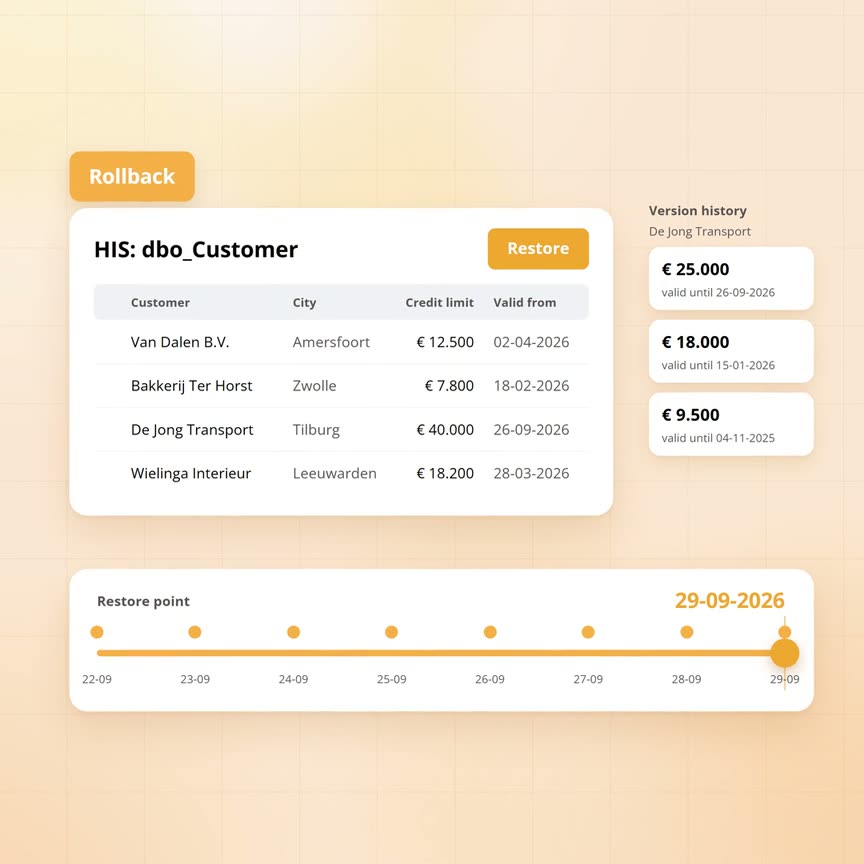
Yres keeps every version of every row. When the credit limit of De Jong Transport went from twenty-five to forty thousand on Monday night, the old value was not overwritten. A new version was added and the old one was given an end date. So you can always look back: what was the limit on 25 September? Twenty-five thousand.
Looking back is not the same as putting back. Reports and dashboards show the current version, and after Monday night that is the wrong one. The right value is still there, closed, but nobody sees it without going looking for it. Meanwhile the credit department is working with forty thousand.
There is something else going on that you cannot see on screen. A table that only fetches changes remembers how far it got: the last modification date it has seen from the source. That is the watermark. Monday night's bad load pushed that watermark forward to Monday night. If you delete the bad rows by hand, the watermark stays where it is, and the next load asks the source only for changes made after Monday night. Anything from before that moment is never fetched again. You end up with a table that looks fine and a gap that never fills itself.
What happens when you roll back, step by step
Back to the wholesaler. The administrator opens the customer table in Yres, chooses rollback and enters Monday 23:59. The moment counts to the second. Yres then builds one script of three to five steps and runs it in one go.
First a check: does the table you named exist in Yres's own records? If not, it stops here with an error in the log. Then the four steps that change something. All rows loaded after Monday 23:59 are removed, including the wrong version of De Jong Transport. The versions that applied at that moment and were closed afterwards are reopened: twenty-five thousand is the current limit again. If this table issues its own sequence numbers for new customers, the numbers handed out since Monday 23:59 are withdrawn, so a new customer never gets a number that already appears in a report. And if the table only fetches changes, the watermark is recalculated from what is still in the table. That lands it on the last change from before the bad load, without anyone having to work it out.
Every rollback leaves one line in the log: which table, which window, who did it, how many rows went, how long it took and whether it succeeded. If something fails halfway, that is recorded too, with a pointer to the detailed log.
The Yres monitoring screen uses that same log line. Every load that fell inside the rolled-back window is marked there as deleted, with the administrator's name and the time. If two good loads ran on the customer table on Tuesday morning, those show as deleted as well. That is correct: they were rolled back too and need to run again.
| What | Before the rollback | After the rollback |
|---|---|---|
| The rows in the table | Everything is there, including what came in wrong on Monday night | Everything loaded after the chosen moment is gone; the count is in the log |
| The current value per customer | Monday night's wrong version is current, the right one is closed | The version that applied at the chosen moment is current again |
| Sequence numbers for new customers | Numbers handed out since the moment still exist | Those numbers are withdrawn; only for tables that issue their own numbers |
| The watermark for the next load | Sits at Monday night, the last change the bad load saw | Recalculated from what is still in the table; only for tables that fetch changes |
| The log | No trace of the action | One line with table, window, administrator, row count, duration and result |
The trap: the next load
Deleting the rows is the easy part. The damage that follows sits in the watermark, and that is why rollback in Yres is an action of its own rather than a manual clean-up.
A table that only fetches changes asks the source every night: give me everything that changed since this moment. That keeps a load small. It also means the source's answer depends entirely on the moment you pass. After the rollback that moment is back on the last change from before the bad load. So on Wednesday night Yres asks for everything since then, and the source delivers the credit limits again, this time from the right column. The three hundred customers get their correct limit back as an ordinary change.
Two details are worth knowing. If the table is completely empty after the rollback, for instance because you went back to before the very first load, there is no last change left to stand on. Yres then fetches the source in full. And the question to the source is 'from and including' the watermark, so the rows changed at that exact moment come along once more. Yres compares every incoming row with the version already there and only creates a new version when something has changed, so no duplicate versions come out of that.
When to use it, and when not to
Rollback is meant for one table that received a load that has to go, where you know from which moment. Three cases that keep coming up in practice.
A source that delivers a period twice. After an update, a payroll package exports September's transactions a second time, with new timestamps. The wage cost table now contains September twice. Roll back to the moment before that export, and the next load fetches September again, once.
A connection that used the wrong column as the key. When a new source was set up, the customer number per branch was chosen as the key instead of the national number. Every customer with three branches appears three times after the first load. Correct the key, roll back to before the first load, load again.
An empty file processed as a valid delivery. The supplier of a price list accidentally puts an empty file in place. Yres reads zero lines and closes every price as if it had expired. Roll back to the moment before that load, and the prices are current again.
Anyone working directly on the database can run the action in trial mode first. Yres then shows the full script with the chosen moment in it and touches nothing, so you see in advance how many rows would go. From the admin screen that is not possible: there it always executes. Note that a trial run still leaves a line in the log, and that the monitoring screen therefore shows the loads in that window as deleted while nothing was deleted.
- Yes: one table, one moment, and the period after it can be loaded again
- Yes: you want to see what would happen first and you have database access; trial mode shows the script and leaves the data alone
- Limit: a load that touched twelve tables means twelve rollbacks, each with its own moment
- Limit: the removed rows are really gone; rolling back the rollback does not exist
- Limit: only the contents of the table change. Columns, tables, views and reports stay as they are
- Limit: anything written outside the warehouse, such as files in a data lake, stays put
- Little point: a table that is fully replaced on every load. There is no older state left to return to
- Little point: the staging layer where the latest load is prepared. It is refilled on the next load anyway
Frequently asked questions
Can I roll back one specific load?
You pick a table and a moment, and everything that table received after it is removed. Choose the moment just before the load that has to go. If good loads ran on the same table afterwards, they go too and have to run again. Other tables from the same night are left untouched.
How do I see afterwards that a rollback happened?
The log holds one line per rollback: the table, the window, who did it, how many rows went, how long it took and the result. The monitoring screen also shows every load that fell inside that window as deleted, with administrator and time.
Can I try it first without changing anything?
Yes, but only directly on the database. In trial mode Yres shows the full script and leaves the data untouched. The admin screen has no such mode and always executes. Bear in mind that a trial run still leaves a line in the log, and the monitoring screen then shows the loads in that window as deleted.
What if I just delete the bad rows myself?
Then the watermark stays on the bad load. The next load asks the source only for changes made after it, and anything from before that moment never comes in again. The table looks fine and silently misses a period. Rolling back through Yres moves the watermark back with it; that is the difference.
