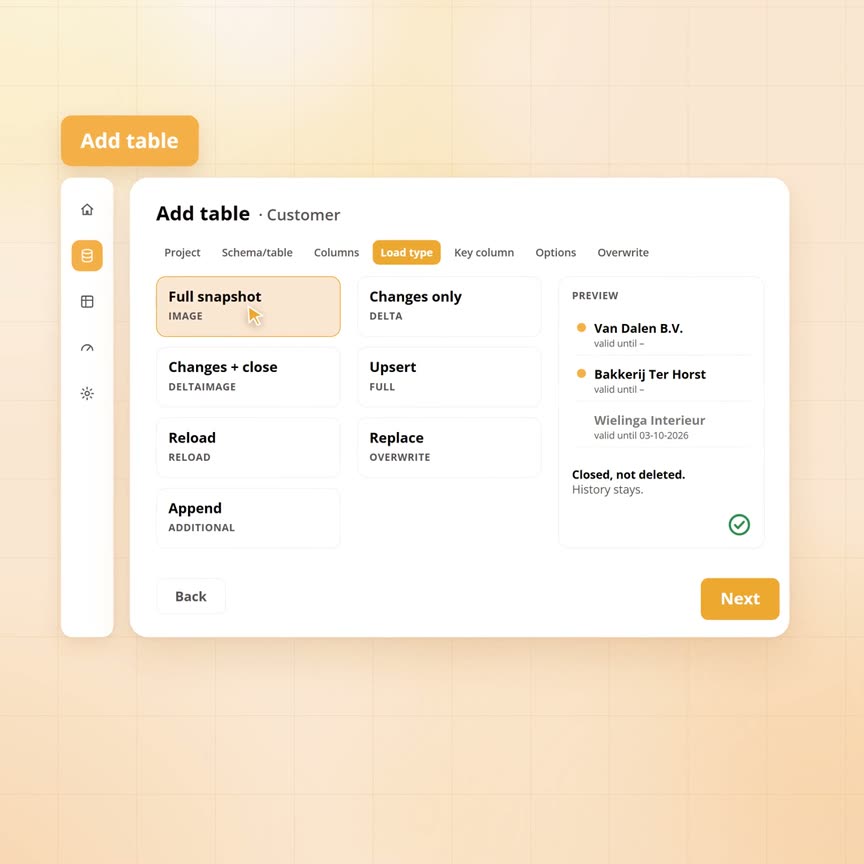
The seven load modes and when to choose which
The price list supplier puts a file with the complete list ready every night. Sanne, the wholesaler's data engineer, wants to put that list down fresh every night. In the admin screen she nearly picks replace, because the word sounds like what she wants. Every old price would have been gone after the next load.
That choice is called the load mode. Yres has seven: six keep history and one discards it. Which one fits depends on what a source can tell you about itself. Below, Sanne goes through the wholesaler's sources one by one. Each source gets a different load mode.
Published: · Last updated: · By Daniel Sanders, architect of Yres and founder of Plainwater
What does a load mode decide?
A load mode decides what Yres does to the history table when new data is loaded. You choose it per table in the admin screen.
Every night a set of rows arrives in the landing zone for each table. The engine compares it with what is already in the history table. For that it uses two fingerprints: one of the key and one of the content. How they work is described in our article on keeping history at hundreds of tables. Every row thus falls into one of four groups:
- New. The key is unknown.
- Changed. The key is known, the content is not.
- Unchanged. Key and content are both known.
- No longer delivered. The row is in the history table, but not in tonight's set.
For those groups the load mode answers three questions. The seven load modes are seven combinations of answers.
- Does a changed row get a new version, or is the old one overwritten?
- Does a row that is no longer delivered stay, get closed or disappear?
- Does the watermark move afterwards? That is the last modified date the engine saw from the source.
Sanne has the wholesaler's sources in front of her: the accounting package with 280 tables, the HR system with 40, the planning package with 20 and the web shop as an API. She does not have to think about every table separately, because the question is the same per source. Does the source deliver everything every night? Does it have a modified date per row? Does it show which rows were deleted? The load mode follows from those answers.
What are the seven load modes?
Two load modes work with the full delivery, two with only the changes and two put the whole table down again. The seventh only appends.
- Upsert without closing. New rows are added. A changed row gets a new version and the old version an end date. Rows that are no longer delivered stay current.
- Full snapshot. The same, with one difference: every row that is no longer delivered is closed. The row still exists, with the load moment as its end date, but no longer counts as current.
- Changes only. The source is asked for everything changed since the watermark. If the same key appears twice in one load, the row with the latest modified date wins. Rows that were not delivered stay current. The engine cannot tell whether they are unchanged or deleted.
- Delta snapshot. Like changes only, with one extra step. Missing rows whose modified date falls inside the fetched window are closed. That way you catch deletions without fetching the whole table every night.
- Reload. Every current row is closed first. Then the full set goes in as a new generation. The previous generation stays as history.
- Replace. The history table is emptied first and then filled with the new set. Everything from before is gone.
- Append. Every delivered row is added, without a key and without comparison. Loading the same set twice gives duplicate rows.
With the two changes-only modes the watermark moves after a successful load to the highest modified date in the history table. With append it moves along as well. The table shows the option names as they appear in the admin screen.
| Option in the admin screen | New and changed rows | Rows no longer delivered | History | Watermark |
|---|---|---|---|---|
| FULL (upsert without closing) | Added, changed rows get a new version | Stay current | Kept | No |
| IMAGE (full snapshot) | As FULL | All closed, with the load moment as end date | Kept | No |
| DELTA (changes only) | As FULL, only for the fetched changes | Stay current | Kept | Moves after a successful load |
| DELTAIMAGE (delta snapshot) | As DELTA | Closed if their modified date falls inside the fetched window | Kept | Moves after a successful load |
| RELOAD (reload) | All rows come in as a new generation, without comparison | Closed, like all other previous rows | Kept | No |
| OVERWRITE (replace) | All rows come in as new, without comparison | Gone | Gone | No |
| ADDITIONAL (append) | Everything is added, without key or comparison | Stay | Append only | Moves after a successful load |
Sanne chooses per source
The customer table. The accounting package exports all customers every night, but no longer exports deleted ones. So Sanne chooses the full snapshot. Bakkerij Ter Horst moves to Deventer on 2 October. The row with Zwolle is closed and a version with Deventer is added. Nothing happens to the 300 customers who did not change. Wielinga Interieur is removed from the package after a merger. Its row is closed with the moment of the load, but it still exists. The orders from March therefore still point to a customer that exists. A report about today no longer counts Wielinga.
The order lines. These are 40 million rows, each with a modified date. Fetching everything every night would take hours. So Sanne chooses changes only, with the modified date as the watermark column. On the first night the history table is empty and there is no watermark, so the engine fetches everything. After that Yres asks every night for everything from and including the watermark. Lines changed at that exact moment therefore come along once more. The fingerprint sees that the content is the same, so no new version appears.
Some sources deliver rows late. The accounting package stamps the modified date of an order line at the moment an employee opens the line. The line is only saved when the employee is done. If a load runs during that quarter of an hour, the line ends up with a modified date from before the watermark. The next night Yres only asks for what comes after. That line is then never fetched again. This is what the look-back window is for. Per table you state how far back the question to the source may look, as a number with a unit, for example a day or an hour. The load then asks for everything from the watermark minus that window. The fingerprint stops rows that were already in. Rows that arrived late still come in.
The timesheets. The HR system also has a modified date, but here rows get deleted. An employee books four hours to the wrong project, deletes the line and books again. With changes only the wrong line stays current, because the engine never sees it again. So Sanne chooses the delta snapshot, with a look-back window of a week. Every night everything changed in the past week comes in. The engine also closes every current row that is missing and whose modified date falls within that week. That closes the deleted line. A line from three months ago deleted today falls outside the window and stays.
The visitor log. The web shop delivers a log of visits. Every line is an event that never changes again, and no key exists for it. Sanne chooses append, with the time of the event as the watermark column. Every night the new events are added, without anything being compared.
The planning. The planning package only exports the schedule for the coming eight weeks. Anything outside that window is no longer delivered, even though it still exists. Here Sanne chooses upsert without closing. Changed planning lines get a new version. Lines that drop out of the eight-week window stay current.
The most common mistake: replace or reload
Back to the price list. The supplier's file contains the complete list every night, without a modified date per line. The admin screen offers two options that look alike: replace and reload.
Replace empties the history table before the new list goes in. Yesterday's list is then gone, and so is last month's. A question like 'what did this product cost when that order was placed' can no longer be answered from that moment on. The internal sequence numbers of the rows start over as well.
Reload first closes every current row, with the time of the load as its end date. Then the new list goes in as a new generation. All old generations stay, so the question about the price back then can simply be answered.
Sanne chooses reload. Two things are worth knowing:
- The table grows every night. Reload does not compare, so the complete list is added every time, even when nothing changed. For a price list of 4,000 lines that is no problem. For a table of 40 million rows the full snapshot fits better, because it only gives changed rows a new version.
- End dates move along. On every load, reload resets the end date of all older rows, including rows that were closed earlier. Anyone reconstructing history from the end date has to take that into account.
When do you choose which?
Choose on what the source can tell you: does it deliver everything, does it have a reliable modified date and does it show deletions? Three cases from practice show how that works out.
A source that delivers everything without a modified date. The accounting package of a smaller branch exports the whole product table as a file every night. No column says what changed. It does not need to, because the full snapshot compares every row on its fingerprint. Only real changes become a version and vanished products are closed. If vanished rows should stay instead, you choose upsert without closing.
A source whose modified date sometimes lags. The web shop stamps an order's modified date at the start of checkout. An order completed around the time of a load then has a date from before the watermark. Changes only fits here, with a look-back window of a day. Yesterday's orders come along twice and the fingerprint stops them. The late order still comes in.
A source in which rows disappear without a trace. The HR system lets employees delete their own timesheet lines. A deleted line is then no longer delivered. The delta snapshot fits here, with a window that covers the correction period. If employees may still correct hours from three weeks back, the window is three weeks. Deletions from before that are not seen. If that is not acceptable, the full snapshot is the only safe choice.
If you want to load differently just once, you do not have to change the setting. The admin screen offers four of the seven load modes as a one-off choice per load.
Where it stops
- A load mode works on what the source delivers. A deletion the source does not show is only caught by the full snapshot
- The look-back window catches late rows, not errors in the modified date itself. A source that does not update the date on every change is not a delta source
- Append has no key. Loading the same set twice gives duplicate rows
Frequently asked questions
Which load mode do I choose when in doubt?
The full snapshot, as long as the source delivers everything each time. It keeps history, closes vanished rows and needs no modified date. Choose changes only when the table is too large to fetch in full every night. Replace is never chosen out of doubt.
When is replace the right choice?
When history has no meaning. Think of a calendar table you regenerate yourself, a list of country codes or a table you want to reset completely, once. If anyone could ever ask how it was last week, choose reload.
What if my source has no modified date, but does have a created date or a booking date?
Then you use that date as the watermark column, with a look-back window alongside it. Every night Yres then asks for, say, the last 14 days or the current accounting period. Rows adjusted within that period come along. A row that changes outside the window is not seen. How large to make the window is covered in our article on delta loading with a modified date you do not fully trust.
What happens to the watermark when a load fails?
It stays put, because the watermark only moves when the whole load has completed. The monitoring screen reports that it did not advance. The next successful load fetches the difference again by itself, so there is nothing to repair.
My source has a created date and a modified date separately. Which one do I choose?
Both. Per table you can specify a second watermark column, of the same data type as the first. The engine then takes the higher of the two per row. A new order without a modified date comes along on its created date, a changed order on its modified date. That works for all database sources and for a number of API sources.
Talk to a data architect
In 30 minutes a data architect looks at your current data environment with you and at where it pinches today.
Book a call →