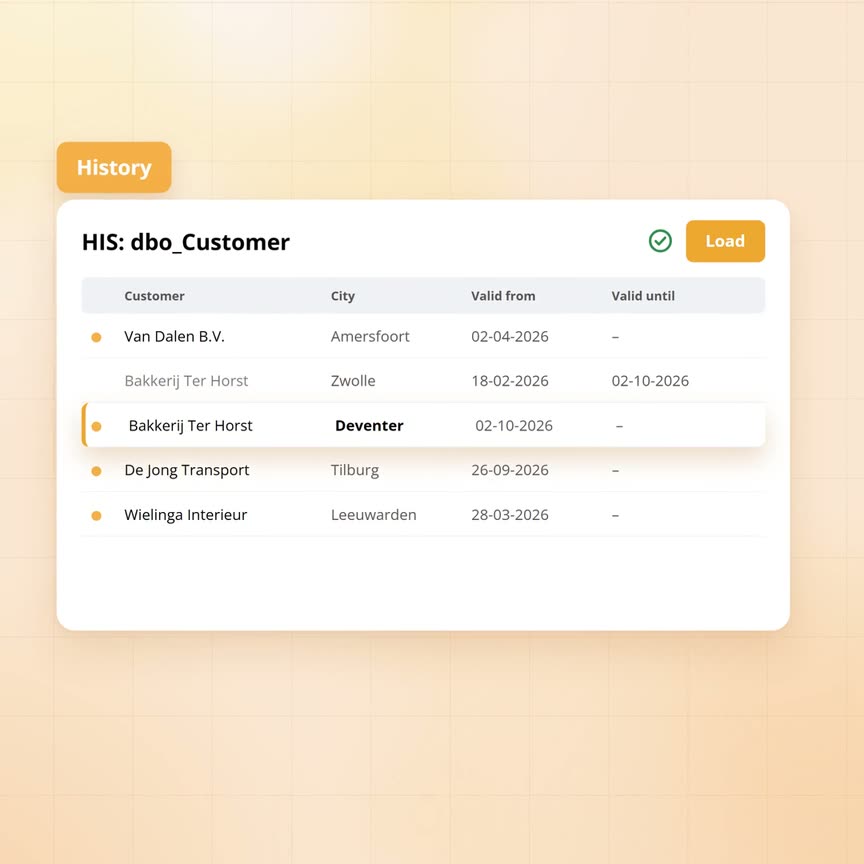
Keeping history on Azure Data Factory: why it falls over at hundreds of tables
Keeping history means a data warehouse never overwrites a value: every change becomes a new version, while the old version stays with the period in which it applied. In the trade this is called SCD2. For one table you build it in Azure Data Factory in a day, but the difficulty is the number. An average organisation loads hundreds of tables, each with its own key, its own columns and its own comparison. This article shows what each table involves, why that does not scale and how Yres solves it with one engine and metadata per table.
Published: · Last updated: · By Daniel Sanders, architect of Yres and founder of Plainwater
What keeping history means
Take a wholesaler that loads its customer data from the accounting package every night. Bakkerij Ter Horst, one of those customers, moves from Zwolle to Deventer on 2 October. In the accounting package the city is simply overwritten, so Zwolle is gone from that moment. In the data warehouse something else happens: the row with Zwolle is closed with 2 October as its end date and a new row is added with Deventer, valid from that same day. Both rows remain.
That lets you answer two kinds of question. Today's question: where is Bakkerij Ter Horst? Deventer. The question about then: which city was the bakery in on 1 March, when that large order was delivered? Zwolle. A revenue report by region for the first quarter therefore counts the bakery under Overijssel, even though it is now in a different municipality, whereas the same report without history would give a different answer every time you opened it.
That is all keeping history amounts to: several versions per row, each with a start and end date, plus for every key exactly one version that is current. The idea is simple, but the execution is not once it concerns more than a handful of tables.
How you build it for one table in Azure Data Factory
Azure Data Factory copies data from A to B and does that well. Keeping history, however, is something other than copying, so you build it around the copy yourself. The usual pattern goes like this: you copy the customer table from the accounting package into an intermediate table and then compare every delivered row with the current version in the history table. That gives one of three outcomes per row: the customer is new, the customer has changed, or nothing has changed. New customers are added, for changed customers you close the old version and add a new one, while unchanged rows are left alone.
Choices arrive immediately. Which columns decide that a customer is the same one: the customer number, or the combination of number and company? Which columns count as a change: only the address fields, or also the last-modified date the package itself keeps and which differs on every export? What do you do with a customer that has been deleted in the package and is therefore no longer delivered: close it, or leave it? And does it count as equal when two fields are both empty?
In Azure Data Factory you can build this in two ways: with a data flow per table, a graphical pipeline that performs the comparison and the write, or with a copy step plus a hand-written merge statement in the database, one per table. For one table this is a day's work including testing, which is a reasonable price.
Why does it fall over at hundreds of tables?
The wholesaler does not load one table. The accounting package alone delivers 280: customers, products, orders, order lines, invoices, payments, stock, suppliers, purchasing, projects and time registration. With the HR system, the web shop and the planning package added it comes to 340 tables, each with its own key, its own set of columns and therefore its own comparison. The pattern above therefore has to be built 340 times.
The first thing that happens is that the rules start to drift, because three developers build 340 variants of the same idea over two years. One closes vanished rows, another does not. One treats an empty value as equal to an empty string, another does not. In one table the end date is the moment of loading, in another the date from the source. After a year nobody knows which table follows which rule, so a report that combines tables gets history that does not line up.
The second is change. An update to the accounting package adds a new field to the customer card, the payment term, which for the customer table means four changes: add the field to the intermediate table, to the history table, to the comparison that decides whether a row changed and to the step that writes. Then test and deploy. That is half a day for one field in one table, while a package update usually touches dozens of tables at once.
The third is time and money. A data flow in Azure Data Factory runs on a compute cluster that has to start up each time and is billed per hour. For a table with two hundred rows that start-up time is the same as for a table with two million, so 340 data flows a night add up to hours of run time whose bill has nothing to do with the amount of data. Hand-written merge statements avoid that, but then all the work shifts to maintaining 340 pieces of code.
The fourth is the failure halfway. An order line table of forty million rows stops at four in the morning, three quarters in, because the database was briefly unreachable. What is in the history table then? With most home-built patterns some of the new versions, with some of the old ones still open, while nothing shows where it stopped. The next morning then starts with investigation instead of reports.
How Yres does it: one engine, metadata per table
In Yres the same pattern does not have to be built 340 times, because there is one engine that keeps history. Per table only what makes that table different is recorded: which columns it has, which columns together form the key and how it is loaded. Every night the engine assembles the script for that table from those facts and runs it. The rules are the same for all 340 tables, because there is only one set of rules.
The engine recognises changes with two fingerprints per row, one of the key and one of the content. The same key with different content means a new version is added and the old one closed, the same key with the same content means nothing is done, while a new key is simply added. Which columns count towards the content fingerprint is recorded per table in the metadata, so a field that changes on every export without anything really changing stays out of the comparison.
How the engine treats vanished rows you choose per table with the load mode, of which Yres has seven. The four that matter most are these. Add and version only, leaving vanished rows in place. Fetch only the changes since last time, using the watermark that is also central to the article on rollback: the last modification date the table has seen from the source. A full snapshot, in which every row no longer delivered is closed as expired while keeping its history. And the combination: fetch only changes and close vanished rows within the period that was fetched. Which mode suits which source depends on what the source can tell you about deletions, which we work out in the article on the seven load modes.
Large tables are processed in parts. If the order line table stalls at four in the morning three quarters in, the completed parts are complete, the last part is rolled back and the watermark still stands at the previous night. The next load fetches the difference again without anyone having to work out where it stopped. A table with hundreds of columns needs no different treatment from a table with five.
And the payment term on the customer card? After the package update you refresh the metadata of the accounting package in the admin screen, after which Yres sees the new field and adds it to the history table. From the next load on it includes the column in the comparison. The same goes for the dozens of other tables the update touched. How that works is covered in the article on schema drift, as is what happens when a source renames a column.
| Per table | Built yourself in Azure Data Factory | With Yres |
|---|---|---|
| Defining key and columns | By hand, again in every data flow or merge statement | Recorded once in the metadata; the engine reads it |
| Comparison and versioning | Built per table, with each developer's own choices | One engine, the same rules for every table |
| Vanished rows | Decided per table, often forgotten | A choice per table from seven load modes |
| New field in the source | Change four places, test, deploy | Refresh metadata; the column is included from the next load |
| Failure halfway through a large table | Half a table, manual investigation | Completed parts stand, the rest is fetched again next time |
| Maintenance at 340 tables | 340 pieces of pipeline or code | 340 lines of metadata and one engine |
When does building it yourself make sense?
Building it yourself is defensible in three cases: with a handful of tables that rarely change, with a team that already has a working pattern and applies it consistently, or when there is a hard requirement to have no extra tooling in the environment. In those cases three things make the difference between a solution and a problem two years from now.
Write the rules down before the first table is built: what is a change, what happens to vanished rows and where does the end date come from. Generate the pipelines from those rules instead of copying and adapting them, because copying is how the 340 variants come about. Test the closing of old versions separately, since that is the part that most often goes wrong silently: the new version is in while the old one is still open, so two years later every customer turns out to have two current addresses.
Anyone who works that out for 340 tables usually ends up with a generator of their own and an engine of their own. That is what Yres is, the difference being that it already exists and has already run into those 340 tables.
- Building it yourself suits: a handful of tables, a team with an existing and consistently applied pattern, or a ban on extra tooling
- In that case: write the rules down first, generate pipelines instead of copying them and test the closing of old versions separately
- Yres suits: tens to hundreds of tables from several sources, sources that change structure regularly, a small team that does not want to maintain 340 pipelines
- Either way: history that follows different rules per table cannot be combined in reports across tables
Frequently asked questions
Do I lose history when a row disappears from the source?
No. Depending on the load mode the row stays current or it is closed as expired, but in both cases all earlier versions are kept. Only the load mode that replaces a table entirely discards history, which is why you choose it only for tables where history has no meaning.
What happens when a load fails halfway?
Large tables are processed in parts, so the parts that were finished are complete and the part that failed is rolled back. The watermark does not move, which means the next load fetches the difference again. The monitoring screen shows that the load failed and that the watermark stayed put.
Can I deviate from the standard rules per table?
Per table you choose the load mode, the key columns and which columns count as a change. Those choices live in the metadata and apply to every load of that table. For a one-off reload you can specify a different load mode for that run without changing the setting.
Don't temporal tables in SQL Server do this automatically?
Partly. A temporal table keeps the old version by itself as soon as you change or delete a row in that table, with the moment the database did so. The comparison is still your job, though: which delivered rows are new, which changed, which disappeared and which columns count. If you write every row again each night, every row gets a new version every night, even when nothing changed, so the hard half of this article remains. On top of that the history cannot be corrected while versioning is on and reporting tools do not know the separate query form for looking back. For a handful of tables whose changes already happen inside the database it is a good choice, as the loading engine for hundreds of source tables it is not.
Do I have to design the history tables myself?
No. Yres reads the structure of the source and records it as metadata. From that it creates the intermediate table and the history table, with the fixed columns for start date, end date, current marker and the two fingerprints. When the source changes, you refresh the metadata and Yres adjusts the tables.
