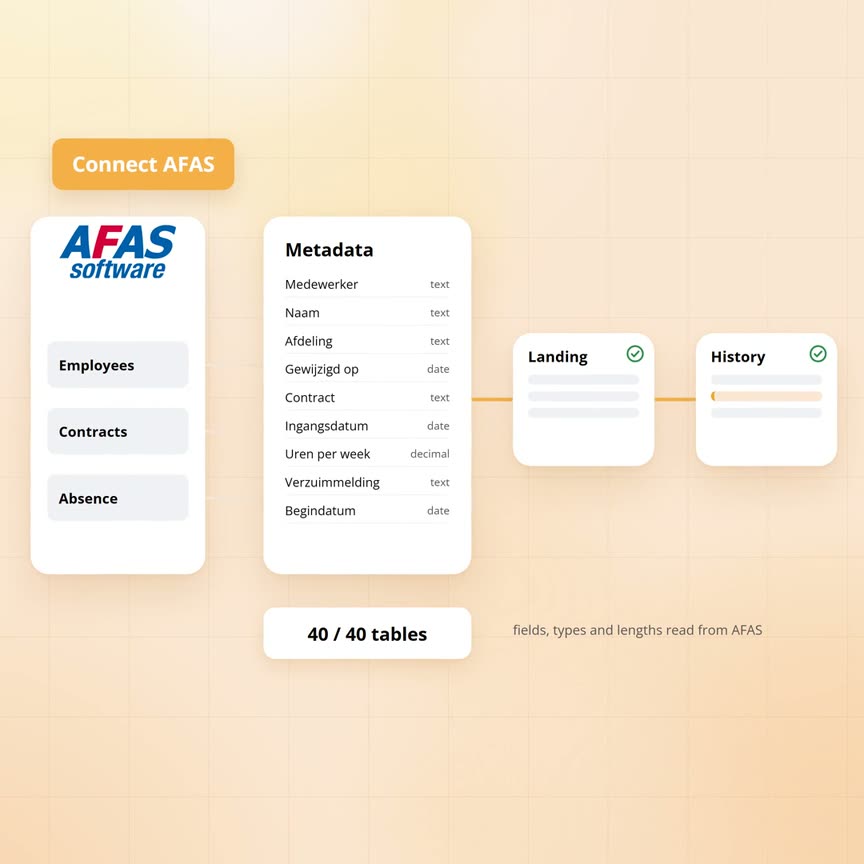
AFAS to an Azure data warehouse: connection versus automation
The wholesaler's HR manager wants to see absence per branch over the past three years. Employees who have left in the meantime have to count too. The HR system is AFAS, with 40 GetConnectors. A connection that fetches the data takes an hour to set up, but it only gives today's state.
A data warehouse only starts after that. It has to know which fields each GetConnector delivers and needs target tables. It keeps history, fetches only the changes at night and shows the next morning what happened.
Sanne, the wholesaler's data engineer, connects AFAS to Yres. Along the way it becomes clear where the connection ends and where the automation begins.
Published: · Last updated: · By Daniel Sanders, architect of Yres and founder of Plainwater
What is a connection to AFAS?
A connection to AFAS fetches data from a GetConnector: a predefined set of fields you can request over the web. Any tool that can call a web address can do that.
The wholesaler runs its HR administration in AFAS. Employees, contracts, absence, pay scales and departments add up to 40 subjects. The HR manager wants to see them in reports next to the revenue from the accounting package. Connecting takes three steps:
- App connector. The AFAS administrator creates an App connector in AFAS and attaches the 40 GetConnectors that Yres may read. AFAS supplies a client ID and a secret with it.
- Add the source. Sanne adds a source in the Yres admin screen. The form asks for the web address of the AFAS environment, the client ID and the secret. The last two go to the key vault in the wholesaler's own Azure environment. The admin screen itself holds no secrets.
- Access key. Before every load Yres fetches a short-lived access key from AFAS itself. It is valid for about an hour and is requested again per page during the load when needed. Yres creates the registration this requires the first time, so nobody pastes or renews a token.
AFAS ends the classic token on 31 August 2027 and recommends this method for server-to-server traffic. AFAS is reachable over the internet. So no separate connection machine has to sit in the wholesaler's network.
That is the connection: an hour's work, coffee included. Any tool that can call a web address has data from a GetConnector within that same hour. That goes for a reporting tool and for a 10-line script. Whoever promises 'a connection to AFAS' is promising this. What it takes after that to turn 40 GetConnectors into a data warehouse follows below.
What Yres reads from AFAS before any data flows
Before the first employee row comes in, the data warehouse has to know what that row looks like. Which fields does the employee GetConnector deliver? What type are they, how long is a text field and how many decimals does an amount have? Without that answer you cannot build a target table. Sanne could look it up and retype it per GetConnector, 40 times.
Yres reads it from AFAS itself. After creating the source, Sanne starts a metadata refresh from the admin screen. Then this happens:
- The list. Yres asks AFAS for the list of all GetConnectors under the App connector.
- The fields. Per GetConnector Yres requests the field description: name, type, length, decimals and the order of the fields.
- Swap. The description lands in the Yres dictionary per GetConnector. The old part is set aside, the fresh description comes in and Yres swaps that one part in one go. Anyone reading the dictionary meanwhile never sees a half-refreshed GetConnector.
- Clean up. A GetConnector the AFAS administrator has deleted disappears from the dictionary afterwards.
- Compare. Yres compares the fresh dictionary with the tables that already exist. The differences are then visible in the admin screen.
One thing AFAS does not say: which field is the key. The field description of a GetConnector says nothing about uniqueness. So Yres records every field as possibly empty and without a key marker. Sanne chooses the key herself, per table, in the wizard she uses to add a GetConnector as a table. Yres makes a prediction she can accept, or she ticks fields herself. For employees that is the employee number, for contracts the employee number plus the start date and for absence the absence number.
In the same wizard she chooses which fields count as a change, the load mode and the column with the modification date. From the dictionary and those choices Yres creates two tables per GetConnector: the landing zone and the history table. The history table gets fixed columns for start date, end date and the two fingerprints from our article on keeping history at hundreds of tables.
Every night: pages, history and the delta on modification date
The first time, everything is loaded. At 3 am the nightly run starts, in this order:
- Plan. The Yres orchestration reads from the metadata which tables are due. Every AFAS table goes to the AFAS pipeline.
- Prepare. The pipeline empties the landing zone and reads from the dictionary which GetConnector field lands in which column.
- Fetch. AFAS delivers one page of rows per call. The pipeline keeps asking for the next page, with the page size set per table. When AFAS returns an empty page, the table is complete.
- Compare. The engine compares every row in the landing zone with the current version in the history table, as with any other source. A new employee number is added. For the same number with different content the old version is closed and a new one is added. With the same content nothing happens.
If one page fails, the loop stops cleanly. The error is in the log with the name of the step and the table shows as failed in the monitoring screen. For every load the monitoring screen shows per table the status, the number of rows and the duration.
The second night is where it gets interesting. The employee GetConnector has a field with the date a record was last modified. Sanne has chosen that field as the modification column and set the load mode to changes only. Yres then builds a filter for AFAS every night: give me all rows whose modification date is on or after the watermark. The watermark is the highest modification date seen in the previous load. If the modification column is a date, Yres puts the watermark in the date format AFAS expects. The very first time the watermark is 1 January 1900, so everything comes along. Yres also asks AFAS to sort the rows by key. That way the pages of one load do not overlap and do not skip anything either.
Two refinements come on top of that:
- Overlap. Sanne can set an overlap, for example one day. Yres then asks for everything from the watermark minus a day. A record updated late still comes along. No duplicate versions appear, because rows with the same content get no new version.
- Two modification columns. A GetConnector can have two date fields that together mean 'last modified', such as a creation date next to a modification date. For AFAS Yres accepts two modification columns of the same type. The filter then becomes: one date on or after the watermark, or the other.
The watermark only moves once the load has completely finished, including the processing into the history table. If a page fails halfway, the watermark stays at the previous night and the monitoring screen reports it. The next night Yres fetches the difference again, without Sanne having to repair anything.
| Step | A connection to AFAS | Yres |
|---|---|---|
| Connect | Web address, client ID and secret in the hands of whoever makes the call. Fetch and refresh the access key yourself | Web address, client ID and secret in the wizard, the secrets in the key vault of your own Azure environment. Yres fetches the short-lived access key itself |
| Knowing which fields exist | Look up and retype per GetConnector | Field description of every GetConnector in the dictionary, swapped in one go per GetConnector |
| Target tables | Design them yourself, 40 times | Landing zone and history table generated from the dictionary |
| History | None, the data is the state of the last call | Versions per row with start and end date, the same engine as for every other source |
| Only the changes | The whole GetConnector every time | Filter on the modification date from the watermark, with overlap and a second column where needed |
| Pages | Build the loop yourself | Page by page until AFAS returns an empty page. A failed page is in the log |
| Monitoring | Per call, if someone logs it | Per table: status, rows, duration and whether the watermark moved |
What happens when AFAS changes?
If a GetConnector changes, you refresh the metadata and update the tables from the dictionary. For AFAS that update is an action you start yourself.
A GetConnector is not a fixed table. The AFAS administrator can add a field, remove one or replace the whole GetConnector. In February he adds the travel allowance field to the contracts GetConnector. Sanne refreshes the AFAS metadata in the admin screen. Yres reads the field description again, swaps the contracts part and compares the dictionary with the existing tables. The new field shows up as a difference. Sanne has the tables updated. On the next load the field takes part in the comparison.
A field that disappears or is renamed is harder. For the data warehouse a renamed field is a field that is gone plus a field that is new. What Yres does with that is covered in our article on schema drift.
Then the sign-in. The short-lived access key expires every hour, but Sanne does not notice. Yres fetches a new one itself. Only the App connector secret can expire or be revoked. If the AFAS administrator revokes the secret, AFAS no longer issues an access key. Every AFAS table then fails that night at the step that fetches the key. The monitoring screen shows 40 failed tables with the same step. The watermark of every table stays put, so after a new secret the next night catches up on everything.
When is a connection enough?
A connection is enough when you have one source and only want to see today's state. Three cases at the wholesaler show the difference.
Today's headcount. The HR manager wants a screen with the number of employees per department. That is one source and the current state, with no comparison to last year. A reporting tool directly on the GetConnector is enough. Yres does not need to sit in between.
Absence over three years. The board wants the absence rate per branch over the past three years. Employees who have since left count too, with the department they worked in at the time. That calls for versions: who worked where, and when. A GetConnector gives the state of now. The Yres history table also gives the state of then.
Hours from three sources. The planner wants contract hours from AFAS next to scheduled hours from the planning package and sold hours from the accounting package. That is three sources with one employee number. This is where a connection per source becomes a data warehouse. The three tables sit in the same database, under the same history rules, loaded by the same engine.
Something else is going on that you do not see in a report. A reporting tool sitting directly on AFAS requests the whole GetConnector on every refresh. Ten reports refreshing every hour add up to 240 calls per day per GetConnector. Yres calls as often as the trigger is set, once a night at the wholesaler. With a modification column it also only asks for that day's rows. AFAS barely notices.
Where it stops
- Yres reads what a GetConnector delivers. Which fields it contains is up to the AFAS administrator
- Fetching only the changes works only if the GetConnector contains a modification date. Without that field Yres loads the GetConnector in full every time, page by page
- The key of a GetConnector is not in AFAS. You choose it yourself, per table
Frequently asked questions
Is 'a connection to AFAS' the same as AFAS in a data warehouse?
No. A connection is the starting point every tool has. Yres uses the same connection and does the rest from the metadata: target tables, history, only the changes and monitoring per table.
AFAS has its own connection for reporting and Power BI. Why a data warehouse then?
For one source and today's figures that is enough. A data warehouse adds history, combines AFAS with other sources on one key and asks AFAS for the changes only once a night. Power BI stays your reporting layer; it just reads from the data warehouse. If you need neither history nor combination, Yres is not the answer here.
Does Yres fetch all 40 GetConnectors in full every night?
Only if you set it up that way per table. A GetConnector with a modification date is loaded with changes only. A GetConnector without such a field is loaded in full. Even then only a row that really changed gets a new version.
What happens when the App connector secret expires?
Then Yres no longer gets an access key and every AFAS table fails that night at the same step. So record the secret's expiry date when you create the source. After a new secret the next night catches up on the difference by itself.
Talk to a data architect
In 30 minutes a data architect looks at your current data environment with you and at where it pinches today.
Book a call →