Keeping history on Azure Data Factory: why it falls over at hundreds of tables
Keeping history for one table is a day's work in Azure Data Factory, and that is a reasonable price.
But a mid-sized organisation does not load one table. It soon loads hundreds, each with its own key, its own columns and its own comparison. That is where the problem lies: in the number, not in the technology.
Below you can read what each table involves, where it falls over and when building it yourself does make sense.
Published: · Last updated: · By Daniel Sanders, architect of Yres and founder of Plainwater
What keeping history means
Keeping history means a data warehouse never overwrites a value. Every change becomes a new version, and the old version stays with the period in which it applied. In the trade this is called SCD2.
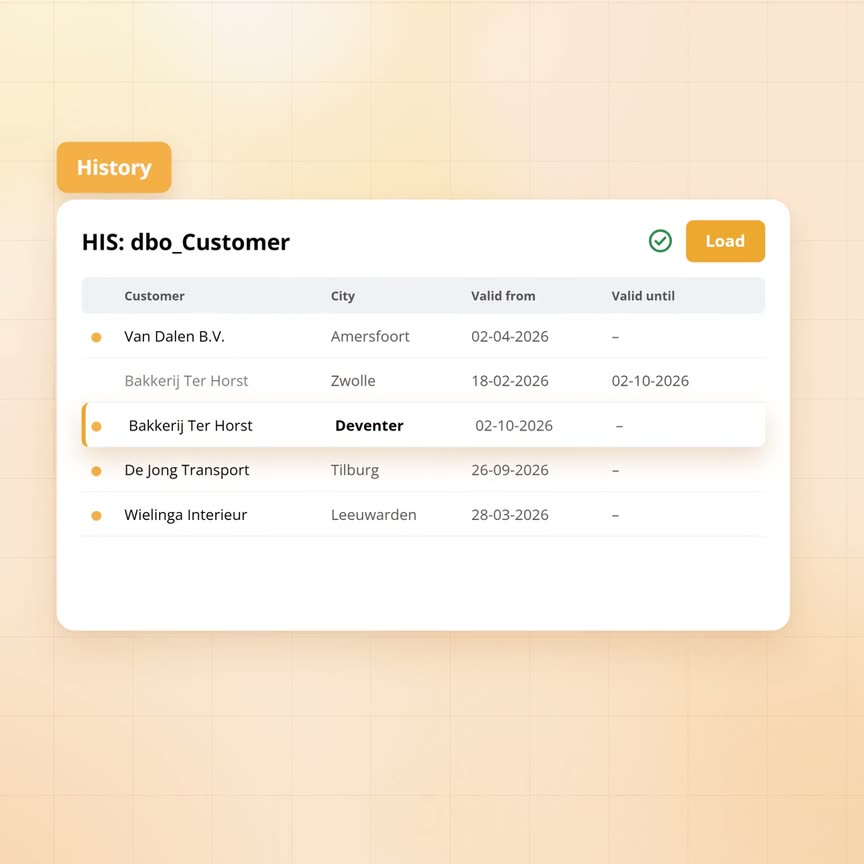
An example. A wholesaler loads customer data from its accounting package every night. One of those customers, Bakkerij Ter Horst, moves from Zwolle to Deventer on 2 October. The accounting package simply overwrites the town, and Zwolle is gone. In the data warehouse the row with Zwolle gets an end date, 2 October. A new row is added with Deventer, valid from the same day. Both rows remain.
That lets you answer two kinds of question. Where is Bakkerij Ter Horst now? In Deventer. And where was the bakery on 1 March, when that large order was delivered? In Zwolle. A revenue report per branch town for the first quarter therefore counts the bakery under Zwolle. Without history, the same report gives a different answer after the move.
That is what it comes down to: several versions per row with a start and end date, and always one current version per key. The idea is simple, but carrying it out stops being simple once you have more than a handful of tables.
How you build it for one table in Azure Data Factory
Azure Data Factory copies data from A to B, and it does that well. Keeping history is something other than copying, though, so you build it around the copy yourself.
The usual pattern goes like this. You copy the customer table from the accounting package into a staging table. Then you compare every delivered row with the current version in the history table. Each row has one of three outcomes. A new customer is added. For a changed customer you close the old version and add a new one. A row in which nothing changed is left alone.
Choices follow straight away. Does the customer number decide whether a customer is the same one, or the combination of number and company? Does only a new address count as a change, or also the modification date the package keeps itself and which differs on every export? Do you close a customer that was deleted in the package, or leave it? And are two empty fields equal to each other?
You can build this in two ways. With a data flow per table, a graphical pipeline that compares and writes. Or with a copy step plus a hand-written merge statement in the database, also one per table. Including testing, that is a day's work for one table.
Why does it fall over at hundreds of tables?
The wholesaler does not load one table. The accounting package alone delivers 280: customers, products, orders, order lines, invoices, payments, stock, suppliers, purchasing, projects and time registration. Add the HR system, the web shop and the planning package and you reach 340. So you build the pattern above 340 times.
Then four things happen.
The rules drift apart. Three developers build 340 variants of the same idea over two years. One closes rows that disappeared, the other does not. One treats a null as equal to an empty string, the other does not. In one table the end date comes from the load moment, in another from the source. After a year nobody knows which table follows which rule, and a report that combines tables gets history that does not line up.
Every change is manual work. After an update the customer card in the accounting package gets a new field, the payment term. For the customer table that means four changes: the field has to go into the staging table, the history table, the comparison and the step that writes. Then come testing and deployment. That is half a day for one field in one table, while a package update usually touches dozens of tables at once.
You pay for start-up time. A data flow runs on a compute cluster that has to start every time and is billed by the hour. For a table with 200 rows that start-up takes as long as for a table with 2 million. With 340 data flows a night that adds up to hours of run time, and the bill has nothing to do with the volume of data. Hand-written merge statements avoid that, but then the work shifts to maintaining 340 pieces of code.
A failure halfway leaves a mess. An order line table of 40 million rows stops three quarters of the way through at four in the morning, because the database was briefly unreachable. With most home-built patterns, part of the new versions is then in the history table while part of the old ones is still open. Nothing shows where it stopped. The next morning starts with investigation instead of reports.
How Yres does it: one engine, metadata per table
In Yres you do not build the same pattern 340 times. There is one engine that keeps history. Per table, only what makes that table different is recorded: which columns it has, which columns together form the key and how it is loaded. Every night the engine assembles the script for that table from this and runs it. There is only one set of rules, so all 340 tables follow the same rules.
The engine recognises changes by two fingerprints per row, one of the key and one of the content. If the key is known but the content differs, a new version is added and the old one is closed. If everything is the same, nothing happens. An unknown key is simply added.
Which columns count towards the content fingerprint is set per table in the metadata. A field that changes on every export without anything really changing stays out of the comparison that way.
How the engine handles rows that disappear is something you choose per table with the load mode. Yres has seven. The four most important:
- Add and version only. Rows that disappear stay where they are.
- Fetch changes only. The table fetches everything since the watermark, the last modification date it has seen from the source. The article on rollback has more on that.
- Full snapshot. A row that is no longer delivered is closed as expired, with its history kept.
- The combination. Fetch changes only and close rows that disappeared within the fetched period.
Which load mode suits which source depends on what the source can tell you about deletions. We work that out in the article on the seven load modes.
The engine processes large tables in parts. If the order line table stops three quarters of the way through at four in the morning, the completed parts are complete. The last part has been rolled back and the watermark is still on the previous night. On the next load Yres fetches the difference again, and nobody has to work out where it stopped. A table with hundreds of columns needs no different treatment from a table with five.
And that payment term on the customer card? After the package update you refresh the metadata of the accounting package in the admin screen. Yres sees the new field and adds it to the history table. From the next load the column counts in the comparison, just like in the dozens of other tables the update touched. How that works, and what happens when a source renames a column, is covered in the article on schema drift.
| Per table | Built yourself in Azure Data Factory | With Yres |
|---|---|---|
| Defining key and columns | By hand, again in every data flow or merge statement | Recorded once in the metadata, the engine reads it |
| Comparison and versioning | Built per table, with each developer's own choices | One engine, the same rules for every table |
| Rows that disappear | Thought up per table, often forgotten | A choice per table from seven load modes |
| New field in the source | Change four places, test, deploy | Refresh the metadata, the column joins from the next load |
| Failure halfway through a large table | Half a table, investigate by hand | Completed parts stay, the rest is fetched again next time |
| Maintenance at 340 tables | 340 pieces of pipeline or code | 340 lines of metadata and one engine |
When does building it yourself make sense?
Building it yourself is defensible for a handful of tables that rarely change, for a team that already applies a working pattern consistently, or when there is a hard requirement not to add tooling to the environment. Even then, three things decide whether it is a solution or a problem two years from now.
Write the rules down first, before you build the first table: what counts as a change, what happens to rows that disappear and where the end date comes from. Then generate the pipelines from those rules, instead of copying and adapting them. Copying is exactly how the 340 variants come about. And test the closing of old versions separately, because that is where it most often goes quietly wrong. The new version is in, the old one is still open, and two years later every customer turns out to have two current addresses.
Anyone who works that out for 340 tables usually ends up with their own generator and their own engine. That is exactly what Yres is, with one difference: it already exists.
In closing
Keeping history is not a difficult idea. It only becomes difficult when you have to build and maintain it 340 times, by different people and over several years. History that follows different rules per table can no longer be combined in reports. Whoever sees that in advance chooses one set of rules, in a generator of their own or in an engine that already exists.
Frequently asked questions
Do I lose history when a row disappears from the source?
No. Depending on the load mode, the row stays current or is closed as expired. Either way, all earlier versions are kept. Only the load mode that fully replaces a table throws history away. So you choose that one only for tables where history has no meaning.
What happens if a load fails halfway?
Large tables are processed in parts. The completed parts are complete and the failed part has been rolled back. The watermark does not move, so the next load fetches the difference again. The monitoring screen shows that the load failed and that the watermark stayed where it was.
Can I deviate from the standard rules per table?
Yes. Per table you choose the load mode, the key columns and which columns count as a change. Those choices are in the metadata and apply to every load. If you want to reload a table once, you can give a different load mode for that one time without changing the setting.
Don't temporal tables in SQL Server do this automatically?
Partly. A temporal table keeps the old version by itself when you change or delete a row, but the comparison is still your work. If you write all rows again every night, every row gets a new version every night, even when nothing changed. On top of that, you cannot correct the history while versioning is switched on. For a handful of tables it is a good choice. As a load engine for hundreds of source tables it is not.
Do I have to design the history tables myself?
No. Yres reads the structure of the source and records it as metadata. From that it creates the staging table and the history table, with fixed columns for start date, end date, current flag and the two fingerprints. When the source changes, you refresh the metadata and Yres adjusts the tables.
Talk to a data architect
In 30 minutes a data architect looks at your current data environment with you and at where it pinches today.
Book a call →