Schema drift: what happens when a source renames a column
Schema drift means the structure of a source changes while the data warehouse keeps loading from it. A column is added, disappears, gets a different name or a different type. Every package update brings at least one of those four, usually for dozens of tables at once.
After such an update Yres reads the structure of the source again. It compares that with the tables in the data warehouse and shows per table what deviates. Adjusting the tables is then a single action.
One thing Yres deliberately does not do: recognise a rename. Why not, and what you do instead, is explained below using the wholesaler as the example.
Published: · Last updated: · By Daniel Sanders, architect of Yres and founder of Plainwater
Four kinds of change in one update
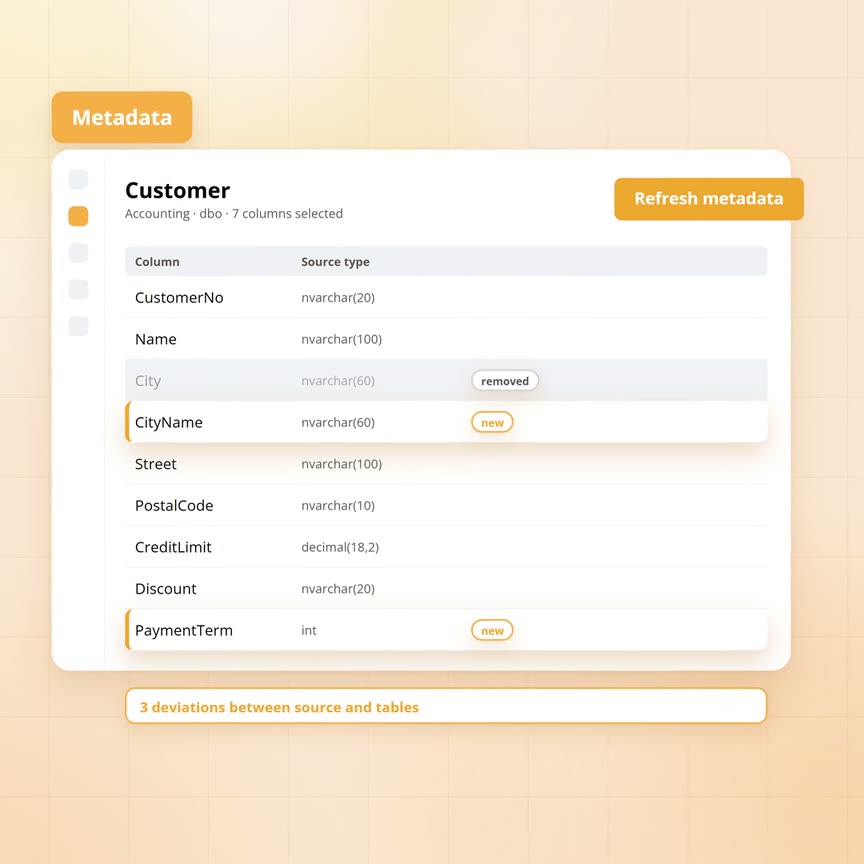
The supplier of the wholesaler's accounting package rolls out a new version in the night of 1 to 2 October, with release notes three lines long. The customer card gets a new field, PaymentTerm. The field City is now called CityName. And the field Discount, until now a text such as '2.5%', becomes a number with two decimals. Those three lines touch 30 tables, the customer table among them.
Between them they cover all four cases of schema drift:
- A column added. The source delivers something the data warehouse does not know yet, such as PaymentTerm.
- A column removed. The data warehouse has a column the source no longer delivers. At the wholesaler this case is hidden inside the rename.
- A new name. For the source that is one change. For the data warehouse it is the two previous cases at once: City disappears and CityName arrives.
- A new type. The column keeps its name, but its content changes, as with Discount.
For a data warehouse that keeps every version of every row, as our article on history at hundreds of tables describes, each case plays out differently. A copy can be thrown away and made again. A history table with two years of versions cannot.
Sanne, the wholesaler's data engineer, sees on Friday morning 2 October in the monitoring screen that the customer table did not come in that night. The load still asked the source for the column City, which no longer exists.
How does Yres see the change?
Yres sees a change by reading the structure of the source again and laying it next to the real tables. That is called refreshing the metadata, and it happens per source.
Sanne opens the accounting package in the management screen and chooses refresh metadata. Then this happens:
- Read. A pipeline reads the catalogue of the source, with schemas, tables, columns, types and lengths.
- Stage. That structure lands in a waiting area first. The old metadata stays in place meanwhile.
- Swap. Only when the pipeline has finished and delivered something does Yres swap the old metadata of that source for the new, in one transaction.
If the source delivers nothing, for instance because of a broken connection, the old metadata stays. A warning goes into the log instead. An empty refresh can therefore never wipe all columns of a source. Anyone with several sources can refresh them all at once.
Then Yres compares. On one side is the desired model: the ticked columns from the metadata, translated to the types of the data warehouse. On the other side are the real tables in the database, the landing zone and the history table. Per column that gives one of three findings:
- The column is in the metadata, but not in the table.
- The column is in the table, but no longer in the metadata.
- The column is in both, with a different type from what Yres would make of it now.
The findings are recorded per table. The table gets a warning in the management screen that the source has deviated, and a comparison screen shows the columns. The Yres check list also reports every ticked column that no longer occurs in the metadata of the source. If that is the column the table uses to fetch its changes, it shows an error rather than a warning.
This is the point that shapes the rest of the story. The refresh is a replacement: the old metadata of the source goes out and the new comes in. A column in a catalogue has no identity beyond its name. So Yres does not see that City was renamed to CityName. It sees that City is gone and that CityName is new. That is no shortcoming of the refresh, because the source itself does not say so either.
Yres translates the types in three layers:
- Per column. First Yres checks whether an administrator has set a type for this one column.
- Per source. If not, it looks at the translation table of this source.
- Per kind of source. Then comes the product-wide translation table: what a decimal from SQL Server becomes, what a date from Oracle becomes, what a text from an API becomes.
If nothing fits, it becomes a wide text field, so that at least nothing is lost. The field Discount thus comes in as a number with the precision the source reports. The management screen shows per column the source type next to the target type.
What happens in each case?
Yres adjusts the tables differently per case, with the action called updating the tables from the metadata. Each time you choose which actions are allowed: add columns, change types or remove columns.
For database sources you start that action yourself, per source or per table. For file, REST and SharePoint sources it is part of the load pipeline itself, with only the actions add and change type. The landing zone is always dropped and made again, because nothing there needs to be kept. The history table is adjusted in place. Only when it is empty and all three actions are allowed does Yres make the history table again too. Anyone with database access can run the action in preview mode first. Yres then shows the full script and touches nothing.
PaymentTerm is the column that is added. After the refresh Yres knows it, but it is not loaded yet. A column only takes part when it is in the metadata and ticked for the table. Sanne opens the customer table, ticks the column and updates the table. The history table gets the column, empty for all existing versions. Van Dalen B.V. therefore has no payment term on 25 September, because the field did not exist yet.
From the next load on the column is filled, and that has a consequence. The engine recognises changes by a fingerprint of a row's content, as the article on keeping history describes. That fingerprint is calculated over the ticked columns. A new column with a value therefore changes it. The first load after the update closes the current version of every customer with a payment term and adds a new one. That is correct, because the row has changed. Anyone who does not want that can keep the column out of the fingerprint per table.
City is the column that disappears. After the refresh it is no longer in the metadata. The engine no longer asks the source for it, and the landing zone is made again without the column. The history table keeps it with all old values: Zwolle on the version of Bakkerij Ter Horst that was valid until 2 October, Tilburg on De Jong Transport, Leeuwarden on Wielinga Interieur. New versions get nothing in that column. Removing the column from the history table is a separate, deliberate choice with the action remove. After that the old values are gone. As long as you do not, the check list keeps pointing out that a ticked column no longer exists in the source.
CityName is the renamed column, so the two previous cases at once. The old column City stays with values until 2 October. The new column CityName arrives with values from 2 October. The bakery moved to Deventer on that same day. That move therefore sits under the new name, with Deventer in CityName and Zwolle in City on the closed version. The history is intact, just spread over two columns. The name of a column also counts in the fingerprint. So at the first load after the update every customer gets a new version, including the customers who did not move.
Discount is the column that changes type. The comparison sees that the history table has a text column where the metadata would now make a number. During the update Yres does the following in one transaction:
- Set aside. The old column is set aside.
- New column. A new column with the new type is created.
- Convert. The values are copied across with a conversion.
- Clean up. The old column is dropped and the indexes are rebuilt.
If one value will not convert, everything rolls back. The table then stands as it stood and the error is in the log. At the wholesaler that goes wrong, because '2.5%' is not a number. Sanne can then set her own target type for this column, so the history stays text. Or she has the old values cleaned first.
| Case | After the refresh | After the update |
|---|---|---|
| Column added | Known in the metadata, but only loaded once you tick it | Column in the history table, empty for existing versions and filled from the next load on |
| Column removed | Deviation on the table and a warning in the check list | Landing zone without the column. The history table keeps it with the old values, unless you allow remove |
| Column renamed | Two deviations: the old column is gone, the new one is unknown | Old column with values until the change, new column with values from the change |
| Type changed | Deviation: the type differs from what Yres would make of it now | Values moved to the new type, in one transaction |
| Conversion that fails | Same deviation as above | Everything rolled back. The table stands as it stood and the error is in the log |
| Refresh that delivers nothing | Warning in the log, the old metadata stays | Nothing, because no deviation was recorded |
Why is a rename not recognised?
Yres does not recognise a rename because the source does not say that a column got a new name. A catalogue only describes the state of now.
Every reader with a data warehouse wonders about it: why does Yres not simply rename the column along, so the history continues in one column? The catalogue does not record what a column was called last week. After the refresh Yres has a list on which City no longer appears and CityName does. That is all it knows.
Yres could guess. One column gone, one column added, the same type and the same position in the table: that will be a rename. Usually that is right, sometimes not. The supplier may have dropped a field and at the same time added another field that happens to have the same type. A wrong guess then silently glues two years of history of one field onto another. You can only undo that once someone notices. Two columns side by side are visible, a wrongly merged column is not. That is why Yres leaves the choice to you and shows both changes separately.
The simplest route is to leave the two columns. That happens by itself as long as you do not allow remove. In your own view on the customer table you put the two together: the new value when present, otherwise the old. Reports that run on that view then see one column. After the update Yres rebuilds its own exposure view on the table. Views and reports you built yourself with the old name are yours to adjust. The monitoring screen shows when the table was updated, so you know from which date the new column is filled.
For tables Yres does have a rename. If you change, in the settings of a table, the name it should have in the data warehouse, Yres physically renames the landing zone and the history table at the next update. That happens in one transaction, and the issued sequence numbers move along. If the new name already exists, Yres refuses and logs it. The load history in the monitoring screen stays attached to the old name. Files already in the data lake stay under the old path. This is a management action for the target table. For columns no such action exists.
When do you use it?
You use refresh, review and update for every structural change in a source that is already being loaded. Three cases keep coming back in practice.
A package update that touches dozens of tables. That is what happened at the wholesaler. You refresh once per source and review per table what deviates. Then you tick the new columns you want and update. With 30 tables that is 30 looks. With the Azure Data Factory copy pattern from the article on metadata-driven Copy Data you rebuild 30 tables by hand.
A source that widens a text field. The HR system makes the field JobTitle longer, from 50 to 100 characters. After the refresh the comparison sees a type difference. Updating with change type converts the column. A widening always converts, so this is the safest case.
A column that disappears while reports still use it. The planning package drops the field RouteCode. The history table keeps the column with all old route codes, and new versions have nothing in it. The reports about last year therefore stay right. You allow remove only when nobody needs the old values any more.
It works for every source that is already being loaded, with a refresh per source and an update per source or per table. For database sources you start the update yourself, in preview mode first if you like. For file, REST and SharePoint sources it is part of the load pipeline and never removes anything.
The limits lie in the past and in your own work. A new column stays empty for all versions from before the update, because Yres does not fetch the past of that field after the fact. The first load after a new or renamed column gives every affected row a new version. Views and reports that use an old column name are yours to adjust.
Frequently asked questions
Does Yres adjust my tables automatically when the source changes?
Not silently. For database sources you start the update and choose which actions are allowed. For file, REST and SharePoint sources add and change type happen during the load. Remove never happens there by itself.
Why does Yres not simply rename the column along, so the history continues?
Because a wrong guess cannot be seen. Two columns side by side stand out. Two fields that were wrongly merged look like one tidy column. If you want one column anyway, you put the two together in your own view.
Do I lose history when a column disappears from the source?
No, as long as you do not allow remove during the update. Only the landing zone loses the column, and it keeps nothing anyway. If you do allow remove, the old values are really gone.
What happens when a type change cannot be converted?
Then nothing changes in the table and the error is in the log. You then set your own target type for that column, or have the deviating values cleaned, and update the table again.
Do I have to refresh all sources after a package update?
Only the source that was updated. A refresh replaces the metadata of one source. If several sources were updated at the same time, you can also refresh them all at once.
Talk to a data architect
In 30 minutes a data architect looks at your current data environment with you and at where it pinches today.
Book a call →